

Best small model for tool use on 12 GB of VRAM
November 8, 2026Best small model for tool use on 12 GB of VRAM
We are finishing a tool that turns a plain language request into a cut ready DXF file. It will land on GenBox.eu in the Vector section, and it has one hard constraint: it must run on a local graphics card, without sending drawings to a cloud API. That constraint turned into a useful question. Which small open weight model can reliably turn a sentence into machine readable geometry and call tools without breaking.
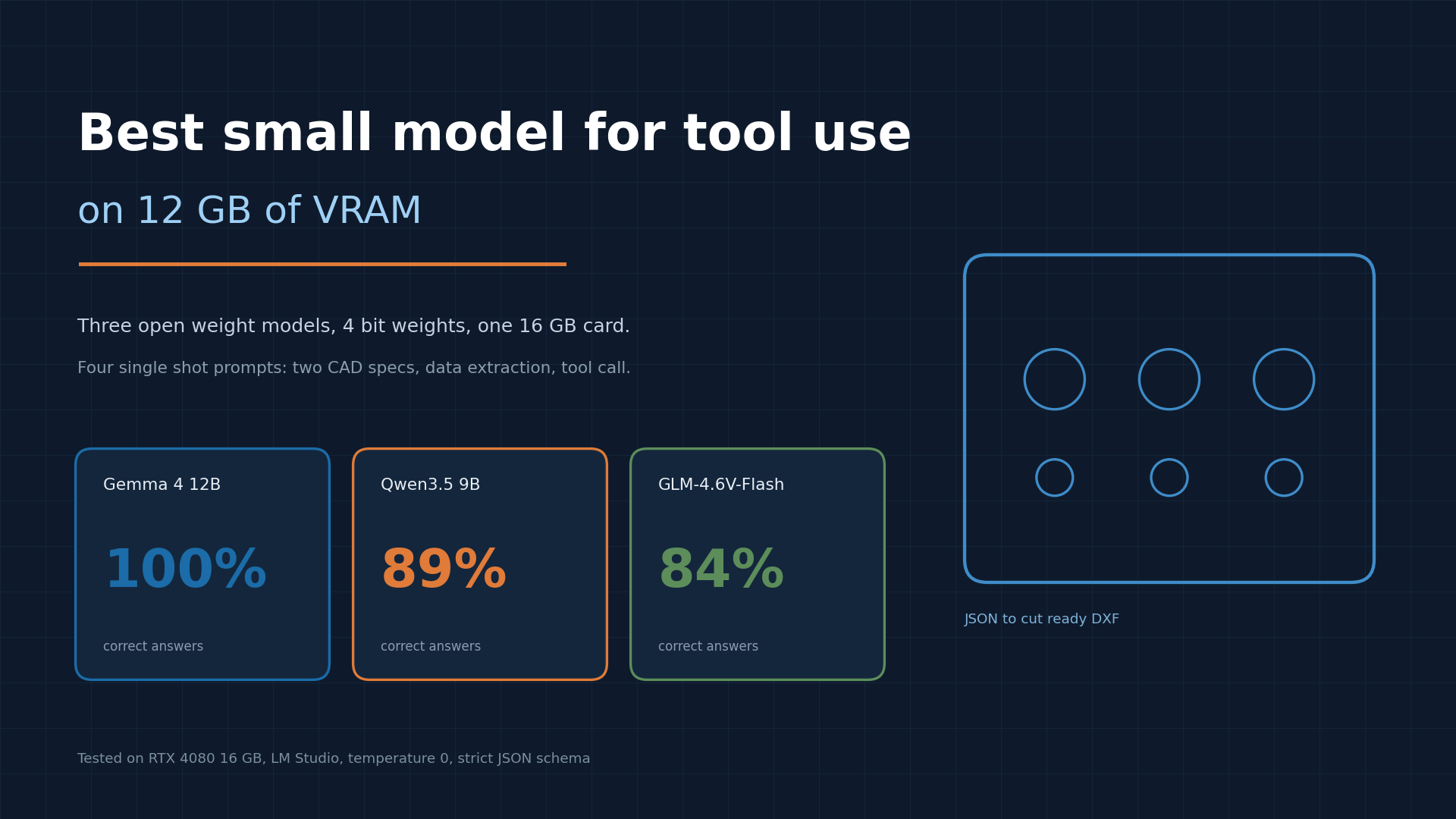
We tested on an RTX 4080 with 16 GB of VRAM, but none of the three models needs that much. All of them fit comfortably inside 12 GB at 4 bit, which is the number that matters if you are shopping for a card or sizing a small workshop machine.
What the tool actually asks of a model
The input is a sentence like “detail 380 by 80 mm, rounded corners R5, four 8 mm holes 10 mm from each corner, sheet 250 by 150”. The model has to output a JSON object with a sheet block and a list of parts. Every part carries width, height, corner radius, and a list of holes with a diameter and an offset from the centre of the part. Not from the corner, not from the sheet. From the centre.
Everything downstream is deterministic: the generator unions the base plate with any addons, subtracts holes and slots, validates wall thickness, writes the DXF layers, and renders a PNG proof for approval. The model only has to produce the JSON, so the model is the weakest link and also the only place where errors can hide.
Test setup
Three models, all local, all 4 bit quantized: Gemma 4 12B (Q40), Qwen3.5 9B (Q4KM), GLM-4.6V-Flash (Q4K_M). They ran on the RTX 4080 machine through LM Studio.
To keep memory honest, every model was ejected before the next one was loaded, using the LM Studio CLI over SSH. Between models the card held nothing but the embedding model. Each run started with a warm up request that was not scored.
Four prompts, one shot each, temperature 0, strict JSON schema:
- a CAD spec with centimetres that must be converted to millimetres, with a detail larger than the sheet
- a CAD spec with corner holes measured from the edges, where positions must be converted to centre offsets
- structured extraction from a short customer email
- a tool call with a function schema, where the model must fill width, height, radius and hole coordinates
No repair loop, no retry, no prompt tuning per model. First answer counts. A prompt scores up to 5 points: sheet size, part size, corner radius, hole set, and hole positions.
Results at a 4000 token budget
Gemma 4 12B took all 19 points. Qwen3.5 9B took 17 and GLM-4.6V-Flash took 16.
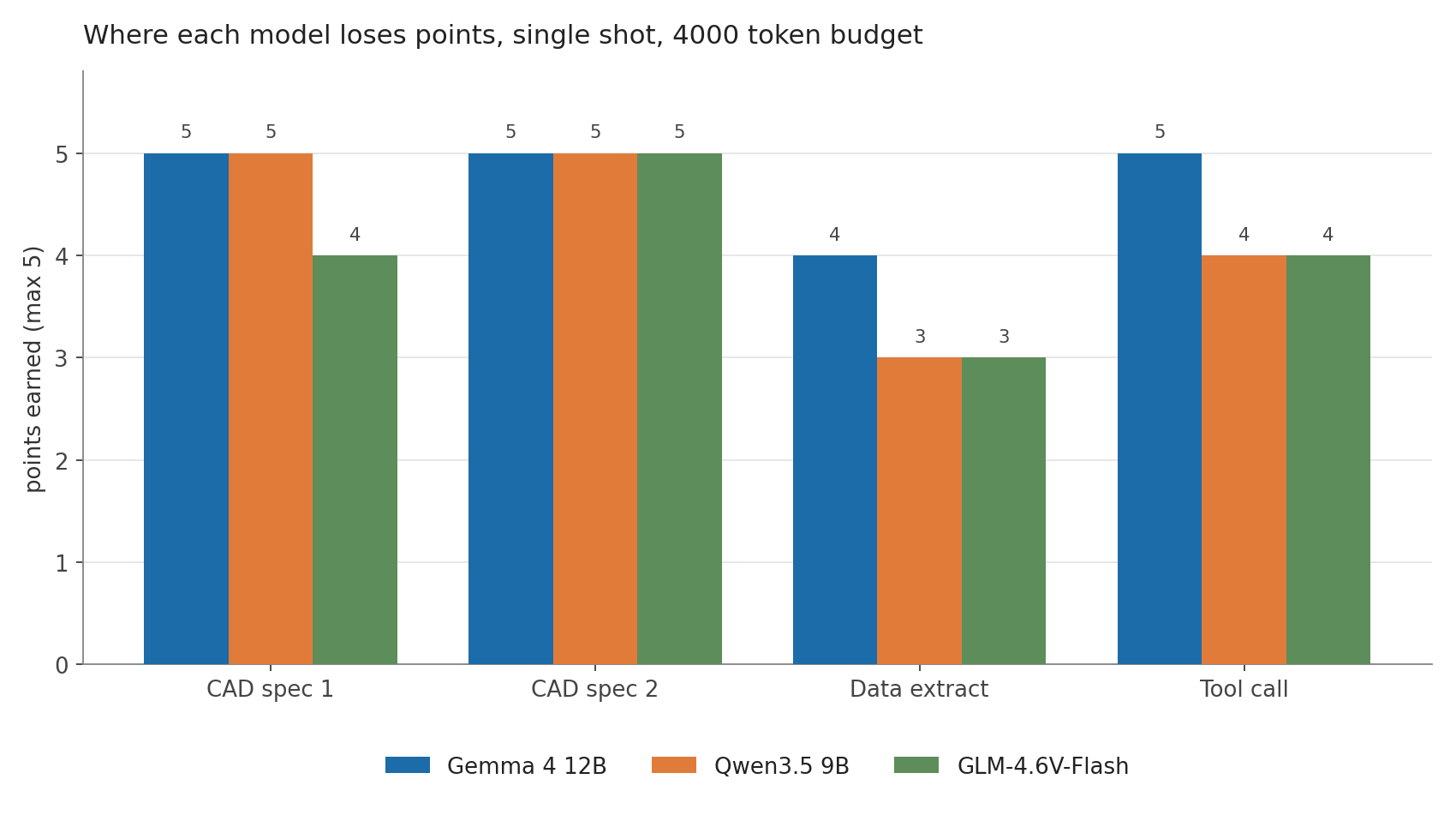
The interesting part is not the total, it is where the points went missing. Both Qwen and GLM produced valid JSON, valid schema, and tool calls with a correct function name. What they got wrong was argument grounding. In the tool call they placed the centre hole away from the origin, as if coordinates were measured from a corner, and in the extraction prompt both swapped width and height, returning 80 by 380 instead of 380 by 80. Gemma made none of those mistakes.
For a CAD pipeline that is the failure mode that matters. A model that writes perfect JSON with the hole in the wrong place is worse than a model that returns something obviously broken, because the mistake survives every schema check and only shows up when the laser cuts.
The token budget trap
The first pass used a 1500 token cap, which looked generous. It was not. All three models think before they answer, and the thinking is billed against the same budget.
When the cap hit, the response ended mid thought with a `length` finish reason and no JSON at all: 1497 to 1500 of 1500 tokens spent on reasoning. Scores collapsed to 74 percent for Gemma, 37 percent for GLM and 20 percent for Qwen. Nothing about the models changed except the output budget.
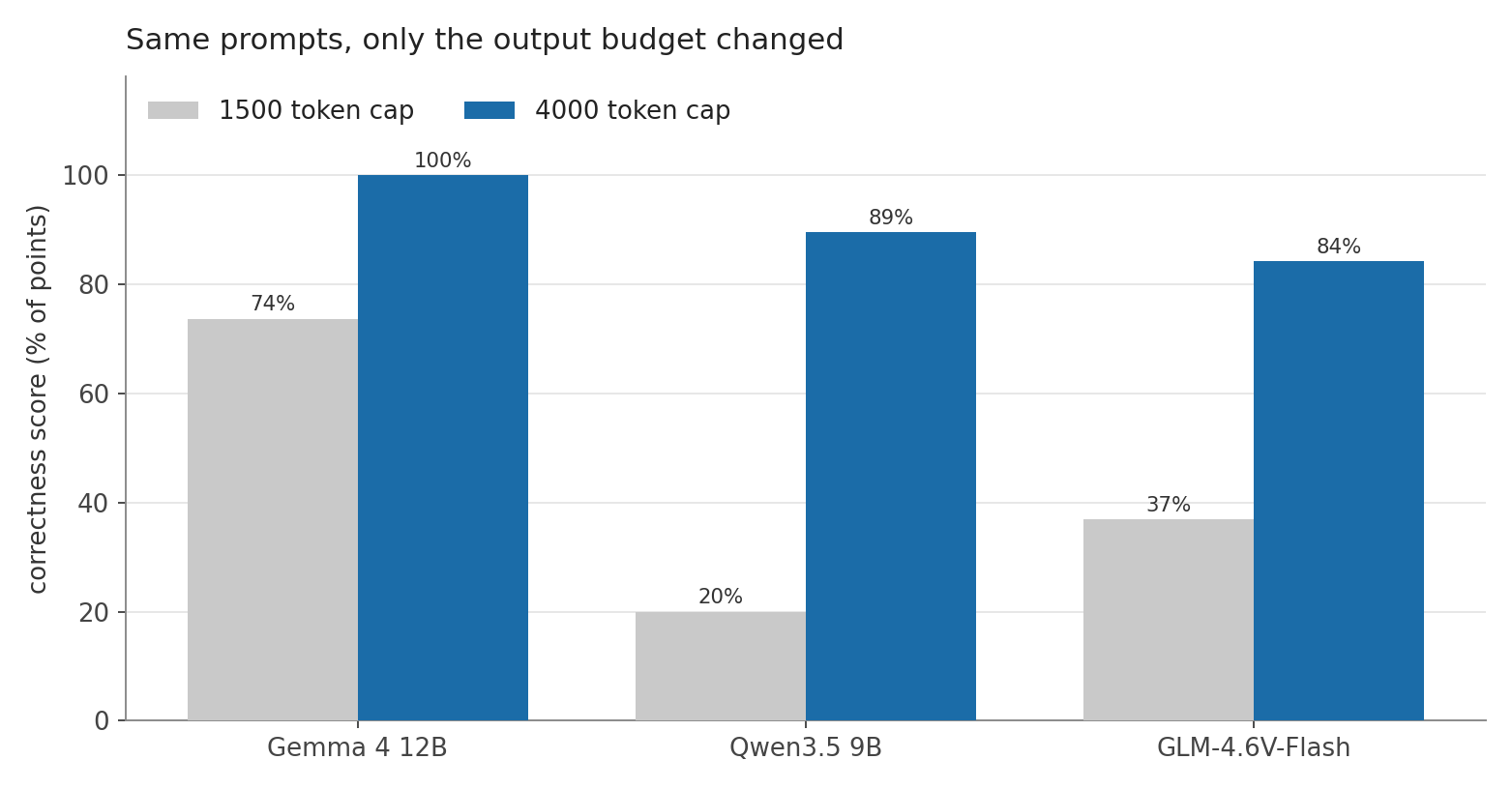
The practical rule that came out of this: for a structured output task with a thinking model, allocate at least 4000 output tokens, or disable thinking when the runtime allows it. On this LM Studio build, neither `enablethinking: false`, `reasoningeffort: none` nor a `/no_think` suffix changed the behaviour for GLM, so the budget is the only lever we control.
Speed is not latency
Raw throughput and real waiting time point in different directions.
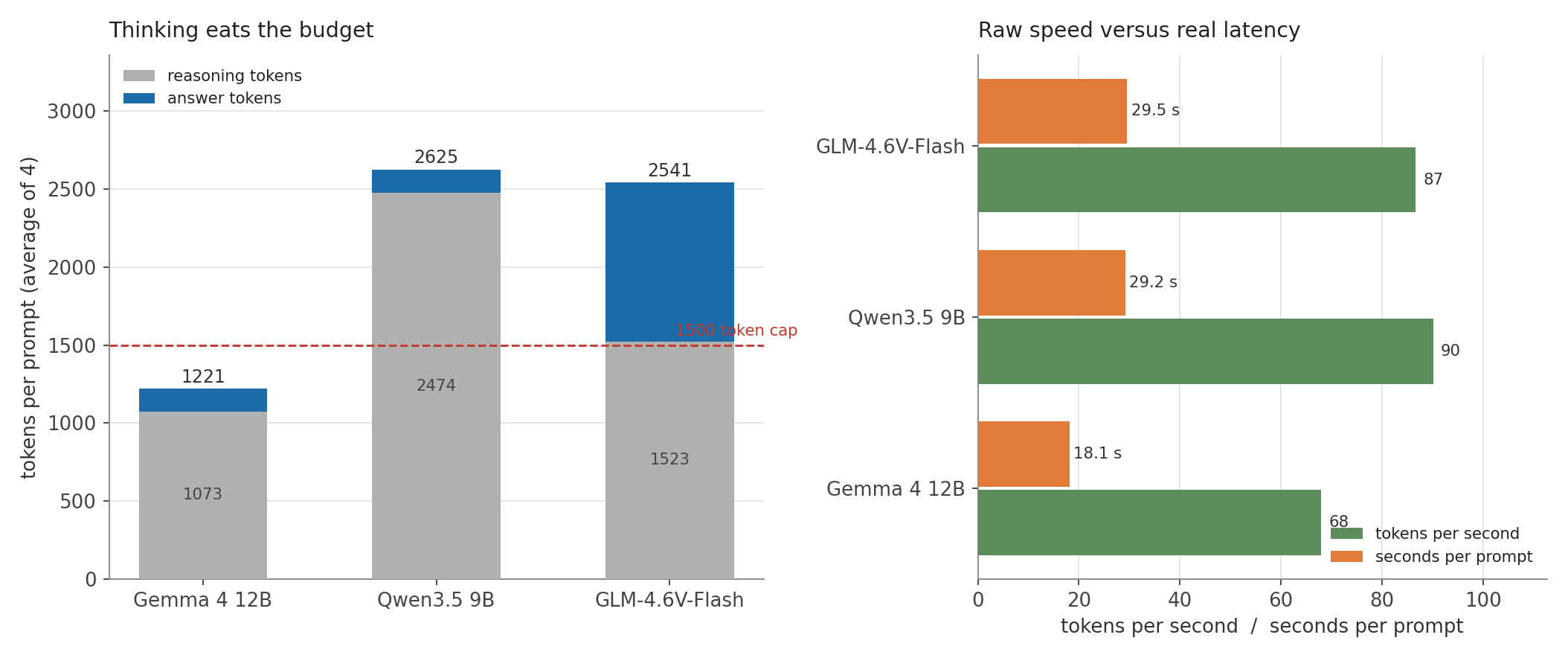
Gemma 4 12B generated 68 tokens per second, the slowest of the three, yet finished prompts in 18.1 seconds on average. Qwen3.5 9B generated 90 tokens per second, the fastest, but needed 29.2 seconds. The difference is reasoning volume: Qwen spent roughly 3000 to 3400 tokens thinking about each CAD prompt, Gemma spent 325 to 2170. Tokens per second is a spec sheet number. Seconds per finished answer is what the person clicking the button experiences.
GLM behaved unevenly. Two prompts were quick at 11 and 20 seconds, one took 39 seconds and 3423 tokens, and the tool call ran into the 4000 token ceiling after 47.8 seconds and still returned wrong coordinates.
What the official benchmarks say
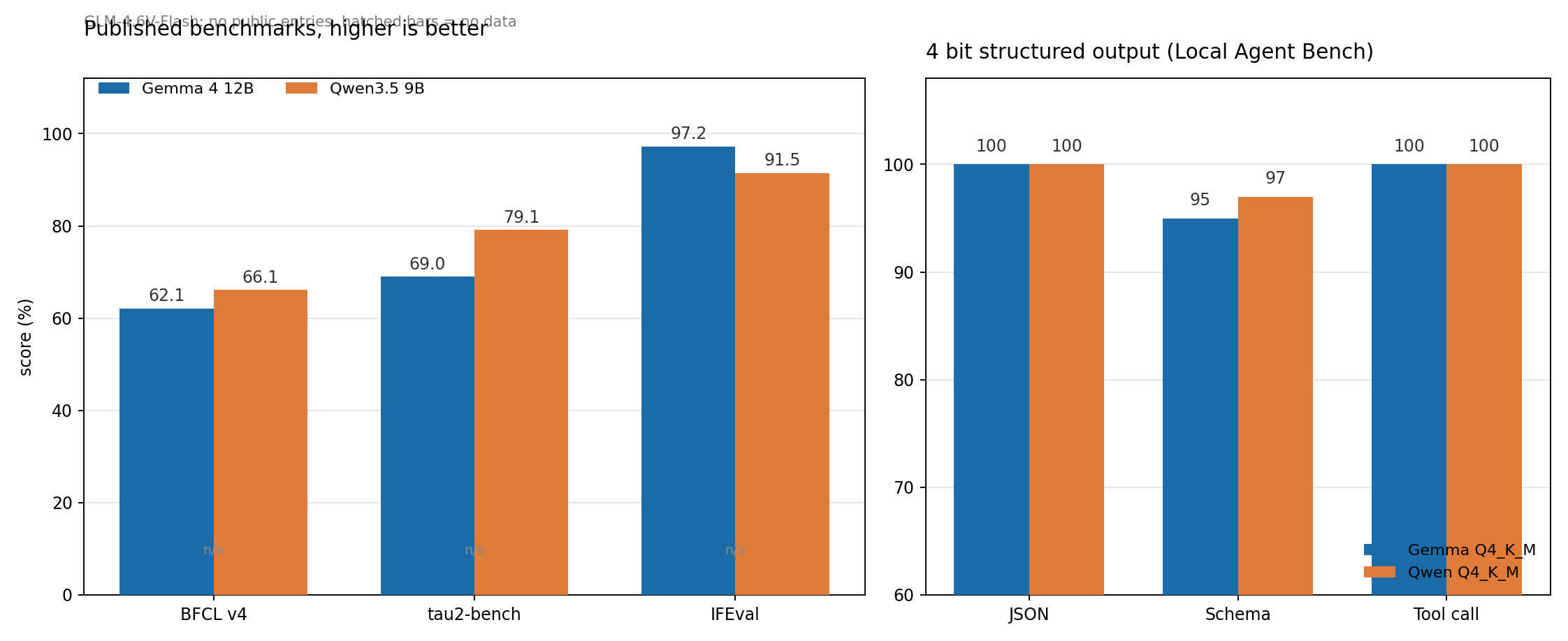
Published numbers exist, but coverage is uneven, and none of these benchmarks measures the thing that broke in our test.
| Benchmark | Gemma 4 12B | Qwen3.5 9B | GLM-4.6V-Flash |
|---|---|---|---|
| BFCL v4 (function calling) | 62.06, third party | 66.1, vendor | no published entry |
| tau2-bench (tool agent) | 69.0 average | 79.1, vendor | no published entry |
| IFEval (instruction following) | 97.2 | 91.5 | no published entry |
| Local Agent Bench, JSON | 100 | 100 | not listed |
| Local Agent Bench, schema | 95 | 97 | not listed |
| Local Agent Bench, tool call | 100 | 100 | not listed |
On BFCL v4, the Berkeley function calling leaderboard, Qwen3.5 9B reports 66.1 and Gemma 4 12B has a third party measurement of 62.06 from TokenRhythm. GLM-4.6V-Flash has no entry we could find, on BFCL or elsewhere, which makes our 16 out of 19 the only data point available for it.
On tau2-bench, which tests multi turn tool agent behaviour, Qwen claims 79.1 and Gemma averages 69.0, split into 75.0 for airline, 77.6 for retail and 54.4 for telecom. Instruction following is the other way around: Gemma scores 97.2 on IFEval in thinking mode against 91.5 for Qwen.
Third party structured output tests are closer to our setup. Local Agent Bench runs 4 bit GGUF models through Ollama on a 24 GB card. There, Qwen3.5 9B at Q4KM scores 100 on JSON, 97 on schema adherence and 100 on tool calls, with an overall 90.6 out of 100, and uses 6.7 GB of VRAM at 32K context. Gemma 4 12B at Q4KM scores 100 on JSON, 95 on schema and 100 on tool calls. GLM is not listed at all.
Read together, the public data and our test agree on the shape of the answer. Both 9 to 12 billion parameter models at 4 bit are competent tool callers, both are close on schema adherence, and neither is a toy. The gap that decides the CAD use case is argument grounding, and that is not what BFCL or JSON benchmarks measure. Those benchmarks ask whether the call is syntactically right and the arguments type correct. They do not ask whether the coordinate means the right thing in your geometry.
What we picked
For the DXF tool, Gemma 4 12B is the default. It is the only model that got every coordinate right, it needs the least thinking, and it finishes the real prompt in 18 seconds on a 16 GB card that could have been a 12 GB one. Qwen3.5 9B stays as a fast option for short, non geometric tasks where the extra 20 percent of raw throughput helps and the budget is generous. GLM-4.6V-Flash keeps its role as the vision model, since it is the one that accepts images on this setup, but it is not our JSON workhorse.
Settings that made it work in practice: temperature 0, strict JSON schema, output budget of at least 4000 tokens, one tool per call, and a hard validation gate before anything reaches the cutter. The last one is worth repeating. The model proposes geometry, the validator decides whether that geometry is physically possible: wall thickness, hole collisions, contact depth for addons, detail fitting the sheet. A wrong model output then becomes a warning in a preview instead of scrap material.
Limits of this test
Four prompts, one run each, a single GPU, one quantisation level per model, single turn only. This is a tool use smoke test, not a benchmark run. Treat the ordering as reliable and the exact percentages as indicative, especially since one prompt is worth 5 points, which makes each answer worth 5 percent of a model's score.
The full test script and both result sets are in our repository. If you want the same test on your own hardware, the only thing you need to change is the model name and the token budget.