

A Local Decision Model That Answers in 33 Milliseconds
September 27, 2026A Local Decision Model That Answers in 33 Milliseconds
Most people meet AI as a chatbot. You type a question, you wait, you read a paragraph back. That works for writing and reasoning, but it is a strange way to make a decision. If all you need is “is this spam”, “which queue does this ticket belong to”, or “should the agent click this button”, you do not want a paragraph. You want a label, fast, again and again, thousands of times.
That is the niche a new class of models is filling: small, local, non-generative “decision” engines. I spent an evening getting one of them (Laya, an open-source project) running on a Windows machine with a consumer GPU, wiring it behind a tiny HTTP API, and pushing it against real data. Here is how it went, what broke, and where it is actually useful.
System 1, in one paragraph
The naming comes from Thinking, Fast and Slow. System 2 is deliberate reasoning: the LLM that plans a trip or writes an essay. System 1 is fast, instinctive recognition: read a billboard, complete a phrase, sort a shape. Decision models are System 1. They do not generate text, so there is nothing to parse and nothing to hallucinate. They read an input, run one forward pass, and return typed answers.
How this is different from an LLM
Put a large language model and a decision model side by side and the difference is structural.
An LLM is autoregressive: it writes one token after another until it decides to stop. Its output is free text, so any program that wants to use the result has to parse it and hope the format survived. Latency grows with the length of the answer, the cost grows with every token, and the model can state something false with total confidence.
A decision model does none of that. It is non-autoregressive: one forward pass, no tokens, no text. You declare the possible answers up front, a set of labels, a scale, or a yes/no, and the model can only return one of them, with a probability. Because the answer space is fixed, it cannot invent a value outside the schema, which is what the vendors mean when they say there is no hallucination and nothing to parse. Latency is roughly constant, and the model is small enough to run on a consumer GPU, or even a laptop.
A rough analogy: an LLM is a colleague who writes you a memo, while a decision model is a classifier that returns a label you defined. The trade is real. A decision model cannot reason, summarise or draft. It only answers questions you can pose in advance. For a surprising number of tasks, that is exactly what you need.
What Laya actually is
Laya is a non-autoregressive decision engine. Instead of a prompt you give it a state (an email, a ticket, a JSON document, a chunk of a web page) and a set of typed questions:
- choice picks one label from a set you define,
- score returns a value on a scale,
- noul returns the probability that the answer is yes.
It answers all of them in a single forward pass, in roughly 33 milliseconds on a modest GPU, and ships a router that detects the language and picks the right checkpoint for you. It supports 100+ languages. The checkpoints are tiny by modern standards: a 421M parameter model for English, a 322M one for multilingual use.
Why everyone is talking about this now
This class of model existed in research long before it had a brand. It got one in September 2026, when a San Francisco company called TypeSafe AI released Jev.
Jev is a proprietary model that, like Laya, takes a block of state plus one or more typed questions and evaluates them in a single parallel pass, returning choice, score or noul answers with probabilities and confidence scores. It is built to be read by software rather than a person. TypeSafe frames it as the first of a class it calls “System One models”, borrowing Kahneman's language, and as a correction to the overconfidence of chat models. The company was founded in 2024 by Diogo Almeida, who spent about four years at OpenAI working on RLHF, ChatGPT and GPT-4, and it left stealth on 15 September 2026 with a $40 million seed round. The name comes from the nineteenth-century economist William Stanley Jevons, whose paradox holds that making a resource cheaper to use tends to increase how much of it is consumed.
The numbers TypeSafe quotes are why developers paid attention: end-to-end responses of 70 to 500 milliseconds, and claims of being 40 to 200 times faster and 40 to 400 times cheaper than frontier models on comparable tasks. Those figures are self-reported, and TypeSafe says so, warning that they likely sit at the high end. The architecture and weights are not public.
What matters here is the shape of the idea, not the vendor. Once Jev showed that typed decisions are a product, open alternatives followed within days. Laya is one of them: the same idea, open source and self-hosted, running on your own hardware.
Where this class of model earns its keep
- Agent control loops. A browser or desktop agent has to pick its next action constantly. Waiting a second per step is a different product from deciding in tens of milliseconds.
- Triage and routing. Which queue, which priority, which team. Typed answers that drop straight into a workflow.
- Guardrails. A fast local check before or after a bigger model runs.
- Extraction as classification. Instead of asking a model to “extract the amount”, ask a choice question over a fixed set, or a yes/no question over a clear statement.
- High volume anything. Lead scoring, spam, moderation, tagging. When the volume is large, cost and latency dominate, and a local model removes both.
- Games and control. TypeSafe’s own demo line was a model that plays Doom; the same loop drives robotics and simulations.
The through-line is simple. When software, not a human, consumes the answer, a typed decision beats a paragraph.
Installing it on Windows
The install is refreshingly boring, with one important trap.
You need Python 3.10 or newer. Create a virtual environment so it does not touch your system Python, then install the package:
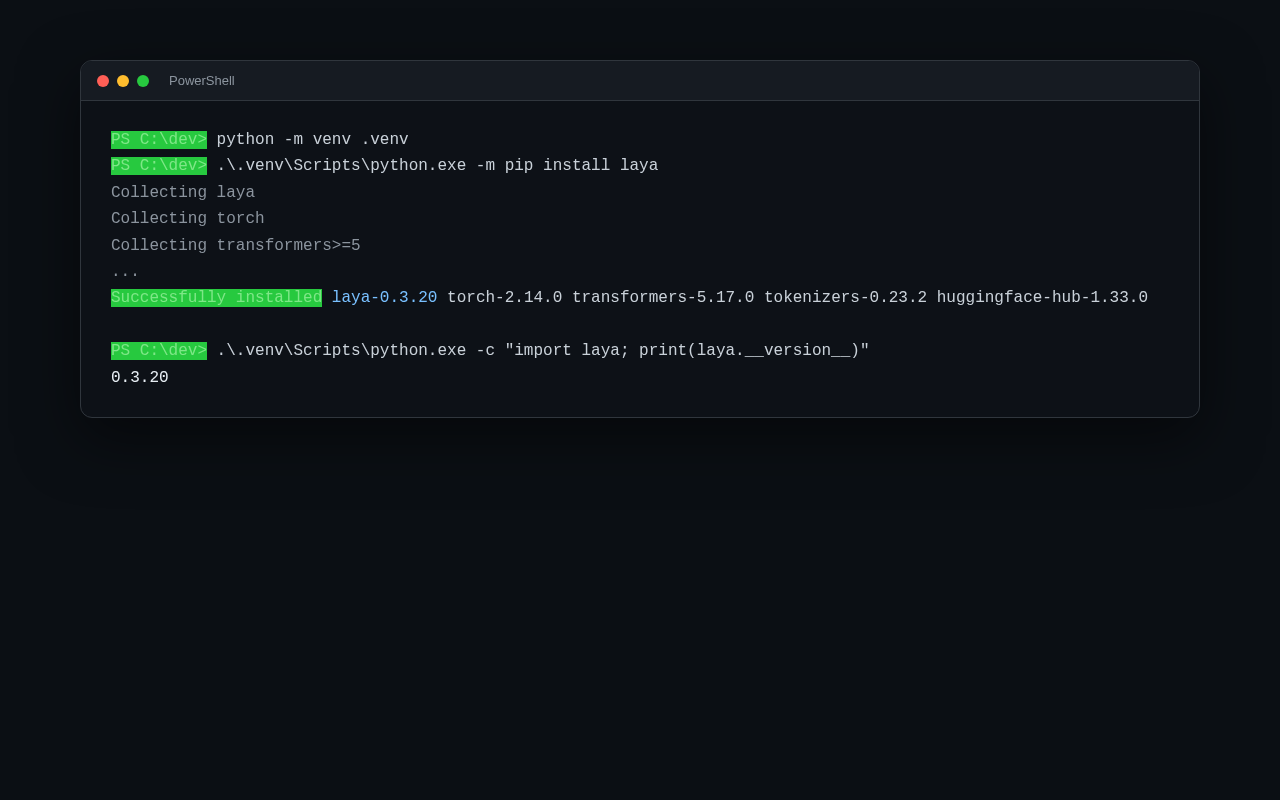
That is it. The package pulls PyTorch, Transformers and the rest automatically. On first use it downloads a checkpoint from Hugging Face, and the first prediction spends a few seconds building the compute graph. After that it is fast.
The trap: your GPU will be idle
This is the mistake that costs people half an hour. The default PyTorch wheel that pip installs from the public index is CPU-only on Windows. Everything works, answers are correct, and it is quietly running on your processor.
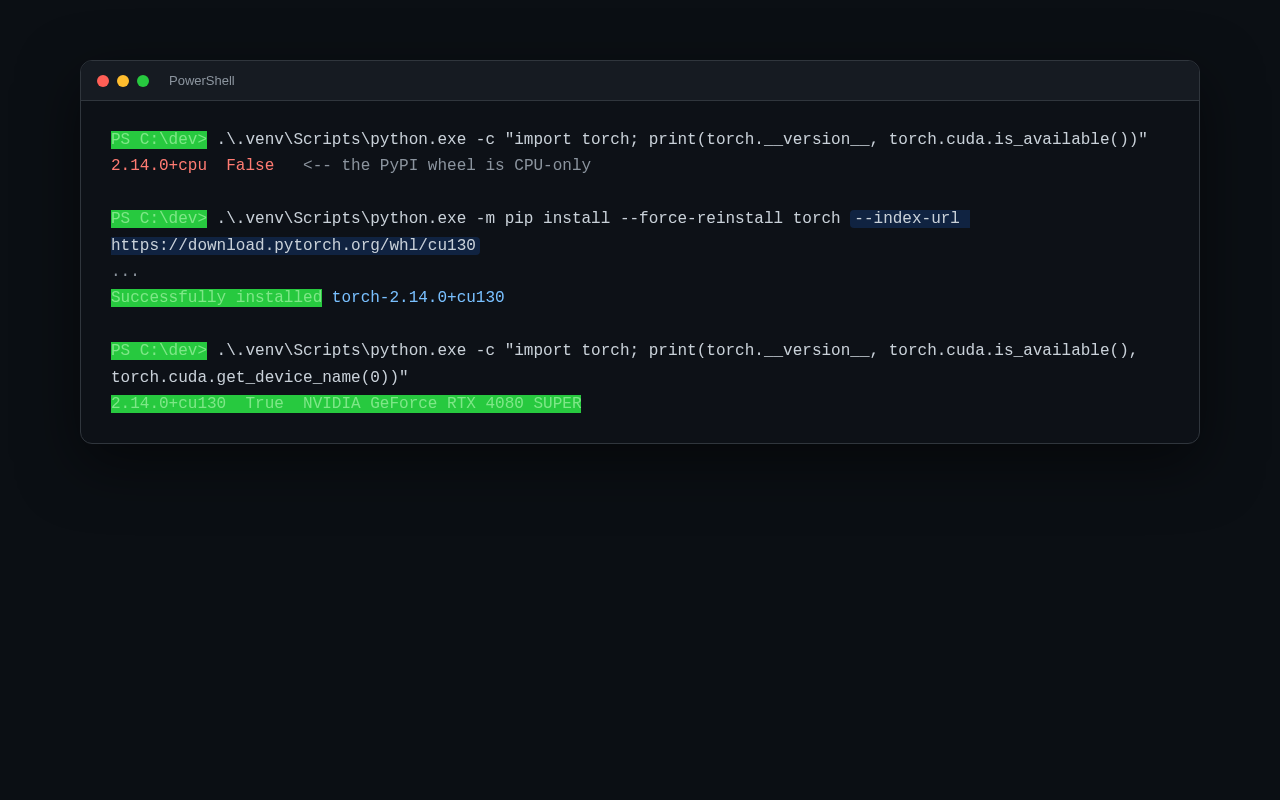
Check it. If `torch.cuda.is_available()` is `False`, reinstall PyTorch from the official CUDA wheel index, then confirm the GPU name shows up. Now that same prediction runs on the graphics card, and 30x speedups are normal.
How fast is it, really
I measured warm latency (after the first call) and batching:
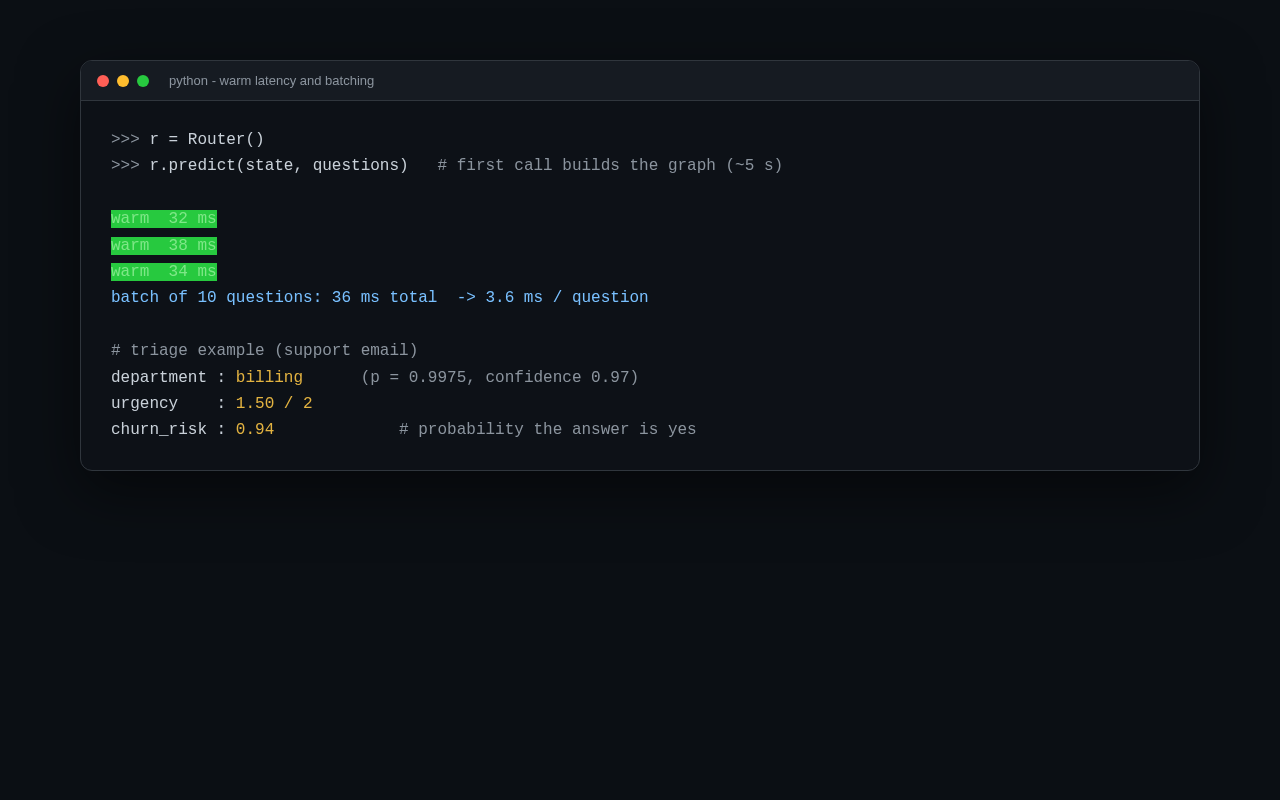
Warm predictions landed at 32 to 38 milliseconds, and a batch of ten questions came back in 36 milliseconds total, about 3.6 milliseconds per question. That matches the project's marketing claim of a single pass around 33 ms. For triage work this is roughly the speed of a fast database query.
Turning it into a service
A library is fine for a script, but if you want several tools (a browser agent, a triage bot, a scraper) to share one model, you put it behind a local HTTP server. There is an extra for that:
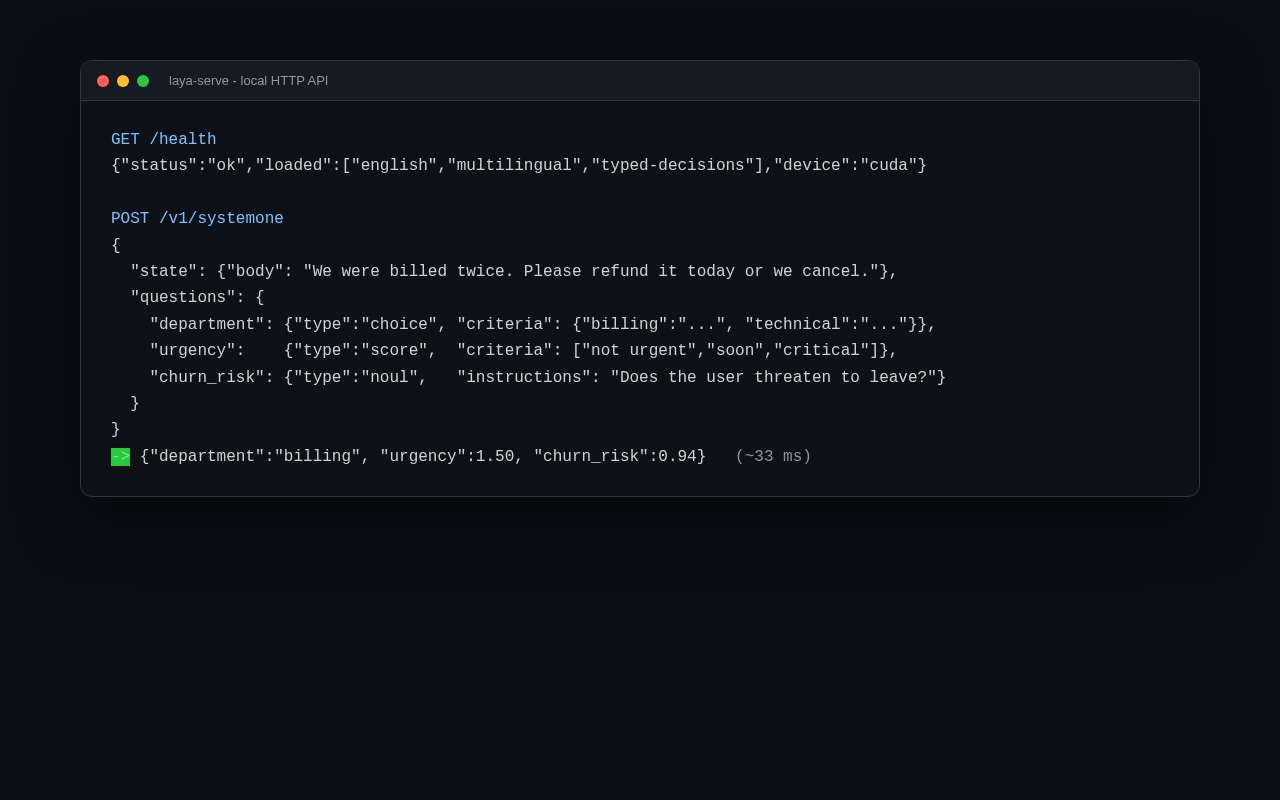
The server exposes a health endpoint and one prediction endpoint that takes the same JSON shape as the library: a state plus typed questions. It preloads the checkpoints so the first real request does not pay the build cost. Handy environment switches cover the device, the bind address and port, and an optional bearer token, so you can keep it on localhost for convenience or lock it down when it leaves your machine.
The wiring is simple:
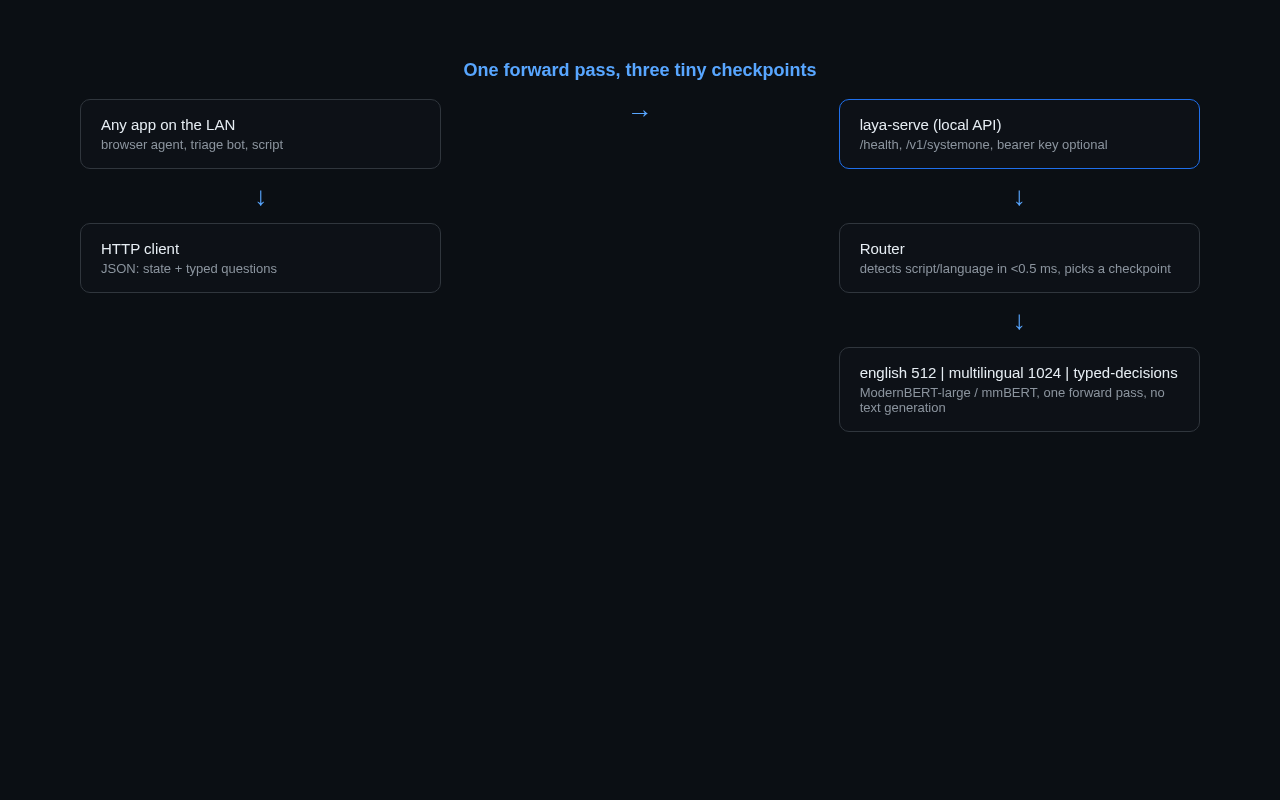
A few sensible guardrails ship with it: a cap on the number of questions per request, a cap on the size of the state, a cap on the request body, and a single worker so forward passes do not fight each other. On Windows I set it to start automatically at logon, so the API is simply always there.
What broke, and what surprised me
PyPI ships a CPU-only build. Covered above; it is the single most common gotcha.
`–help` is not help. Asking the server binary for help does not print usage. It starts the server. Bear that in mind before you run it in a terminal you meant only to inspect.
The API hides the context length. Each checkpoint has its own limit: 512 tokens for the English model, 1024 for the multilingual one, extendable to 8192 when you ask for it in the library. The HTTP endpoint does not expose that knob, so long inputs get truncated at the default. The practical fix is to trim the input yourself to the meaningful part, or to read long documents in windows and aggregate the answers. For most pages the signal lives in the headline and the footer, so a trimmed head-and-tail is enough.
Question design decides everything. This was the real lesson. Vague, evaluative questions (“does this site publish its own content?”) produced saturated answers, close to 1.0, for almost everything. Concrete, checkable questions worked cleanly. Asking “does this text mention a refund?” scored 0.13 on a text with no refund and 0.91 on one that asked for it. “Is this a sandwich?” dropped to 0.00 on a plumbing company's homepage. The model is not broken; abstract questions are.
Zero-shot is a starting point, not a finish line. We benchmarked it against a few hundred human-reviewed pages and, with off-the-shelf questions, the agreement was weak. That is expected for a first-version model, and the project's own numbers say so: fine-tuning on domain-specific decisions lifts accuracy sharply (their benchmark goes from roughly 0.36 to 0.77). The tool is honest about being a v0.x.
What it is good for
- Filters and routers. Spam, moderation, intent routing, “which team owns this”, at a fraction of a cent and without an API call.
- Agent steps. Browser agents need to pick the next action constantly. A 33 ms decision is a different experience than a two-second round trip.
- Guardrails. Fast local checks before or after a bigger model runs.
- Privacy and cost. It runs on your own hardware, offline, so data never leaves the machine and there is no per-call bill.
What it is not
It will not write your article, summarise a meeting or reason through a plan. It gives you labels, not language. And for anything domain-specific, plan on fine-tuning and on spending real effort on the question set. Treat it as a fast classifier you own, not a small chatbot.
The verdict
Laya is a genuinely interesting piece of engineering: small, local, fast, and free of the usual hallucination problem because it never writes a sentence. Getting it running on Windows is a fifteen-minute job if you dodge the CPU-only wheel trap. Standing up the local API is similarly quick, and the guardrails are sane out of the box.
The honest caveat is maturity. Off-the-shelf and out of the box, it will not beat a well-tuned set of regular expressions on a task as specific as ours. Where it earns its place is as a fast, private, cheap decision layer that you then calibrate on your own data. If you have a stream of decisions and your GPU is otherwise idle, it is worth an evening.